
.png)
Description
Download AI Meal Planner – Personalized Fitness Meal Plans, Free 1‑Week Generator
Overview – What Is AI Meal Planner?
AI Meal Planner, created by Utekal Media Ltd., is a web‑based nutrition assistant that leverages modern machine‑learning models to produce fully customized 7‑day meal schedules. Users begin by supplying basic demographic data—age, gender, height, weight—along with activity level, dietary restrictions, and flavor preferences. The algorithm then calculates a personalized basal metabolic rate, applies goal‑specific calorie adjustments (weight loss, muscle gain, maintenance) and distributes the resulting energy budget across protein, carbohydrate, and fat targets. Within seconds, the platform delivers a complete menu that includes breakfast, lunch, dinner, and snack options, each linked to a detailed recipe card featuring cooking time, ingredient list, and macro breakdown.
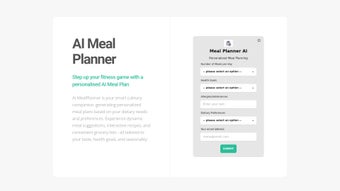
The service is marketed as a “free‑first‑week” experience. During this trial period users can explore the entire feature set without payment, giving them a realistic sense of how AI‑driven personalization can replace generic diet templates. After the trial, a one‑time payment of $19.99 unlocks unlimited weekly plans, deeper macro analytics, grocery‑list export, and the ability to sync the plan with third‑party fitness trackers. The interface is intentionally minimalist: large input fields, auto‑complete drop‑downs for allergens, and a real‑time preview pane that updates as users modify preferences.
AI Meal Planner aims to bridge the gap between scientific nutrition and everyday practicality. By automating the complex calculations that dietitians perform, it saves time, reduces guesswork, and helps users stay consistent with their fitness objectives. Whether you are a beginner seeking structure or an experienced athlete fine‑tuning macronutrients, the tool positions itself as a reliable, low‑cost partner in the pursuit of better health.
Key Features & Benefits
- AI‑Generated 1‑Week Meal Plan: Complete menus appear in under two minutes after data entry.
- Dynamic Macro Balancing: Real‑time adjustment of protein, carbs, and fats to match specific fitness goals.
- Extensive Dietary Filters: Supports vegan, vegetarian, pescatarian, keto, paleo, gluten‑free, dairy‑free, and allergy exclusions.
- Exercise Frequency Integration: Aligns calorie distribution with weekly workout intensity.
- Drag‑and‑Drop Dashboard: Swap meals instantly while preserving macro ratios.
- Printable Grocery Lists: Auto‑generated shopping lists for each week.
- Cross‑Platform Web Access: No downloads required; works on Windows, macOS, Android, and iOS browsers.
Why These Features Matter
Personalization is the cornerstone of effective nutrition. Traditional meal‑plan apps often rely on static templates that ignore individual workout loads, resulting in under‑fueling or over‑eating. AI Meal Planner’s engine evaluates each user’s profile and tailors portion sizes, nutrient ratios, and meal timing accordingly. This precision reduces fatigue on heavy training days and prevents excess caloric intake on rest days, supporting both performance and body‑composition goals.
The dietary filters eliminate the tedious process of manually scanning recipes for allergens or ethical preferences. By embedding these constraints directly into the generation algorithm, the platform guarantees that every suggested dish complies with the user’s constraints, dramatically lowering the risk of accidental exposure. The drag‑and‑drop dashboard further enhances adherence by allowing spontaneous swaps—such as replacing a chicken dish with tofu—without breaking the overall macro balance.
Finally, the printable grocery list translates digital plans into concrete shopping actions. Many users abandon diet plans at the grocery aisle because they cannot locate the right ingredients quickly. With a ready‑made list, shoppers can move through aisles efficiently, reinforcing the connection between planning and execution—a critical factor for long‑term success.
Installation, Usage & Compatibility
How to Get Started
Because AI Meal Planner is delivered as a responsive web application, there is no traditional download or installation process. To begin, visit the official homepage, click the Start Your Free Week button, and create an account using either an email address or a social login (Google, Apple, Facebook). After email verification, the onboarding wizard walks you through five essential steps:
- Enter personal demographics—age, gender, height, weight.
- Select activity level—sedentary, light, moderate, or intense.
- Choose dietary style—vegan, keto, paleo, etc.
- Specify food dislikes, allergies, or medical restrictions.
- Review the generated weekly plan, make optional swaps, and save.
Device & Operating System Support
The platform runs on any modern browser, including Chrome, Edge, Firefox, and Safari. It is fully responsive for smartphones and tablets, meaning users on Windows 10/11, macOS Ventura, Android 9+, and iOS 14+ enjoy the same experience without installing additional software. A “Desktop Mode” toggle expands recipe cards and provides a side‑by‑side calendar view for users who prefer a larger workspace.
Tips for Maximizing the Experience
Accurate input is essential for a precise plan. Be honest about exercise frequency, intensity, and any medical conditions that influence nutrition (e.g., diabetes). If you have a chronic condition, consult a healthcare professional before committing to the plan. After the complimentary week, consider upgrading to the premium package for $19.99 USD; this unlocks unlimited weekly plans, advanced macro reports, CSV export for integration with fitness trackers, and priority customer support.
For power users, the web app offers a hidden “Developer Console” that displays the underlying macro calculations. While not required for everyday use, this feature can satisfy data‑curious individuals who want to understand how the AI arrived at specific calorie allocations.
Pros, Cons & Frequently Asked Questions
Pros
- Highly customized meal plans based on real fitness data.
- Free 1‑week trial allows risk‑free testing.
- Intuitive drag‑and‑drop interface for instant meal swaps.
- Extensive dietary and allergy filters cover most user needs.
- Cross‑platform web access works on Windows, macOS, Android, and iOS.
- Printable grocery lists streamline shopping trips.
- Transparent macro calculations for users who love data.
Cons
- Full functionality requires a paid upgrade after the free week.
- Recipe database, while curated, is limited in sheer variety.
- No real‑time adjustments based on daily activity changes.
- Relies on manual data entry; no automatic wearable integration.
- Advanced features (CSV export, premium reports) are locked behind the paid tier.
Frequently Asked Questions
Is AI Meal Planner really free?
Yes, the first 7‑day meal plan is completely free. You only need to pay if you want to generate additional weeks or access premium features such as grocery‑list export and advanced macro reports.
Can I use the planner on my smartphone?
Absolutely. The web app is fully responsive and works on Android and iOS browsers without any separate download.
How does the AI calculate my macro needs?
The algorithm uses the Mifflin‑St Jeor equation to estimate basal metabolic rate, applies an activity factor based on your selected workout intensity, then adds or subtracts calories according to your goal (e.g., a 20 % surplus for muscle gain). Finally, it distributes the total calories across protein, carbs, and fats following the chosen dietary style.
Do I need to create an account to get the free plan?
Yes, an account is required to store your preferences and generate a personalized plan. You can sign up with an email address or use a social login such as Google or Apple.
Is my personal data safe?
Utekal Media Ltd. follows GDPR‑compliant privacy practices. All data is encrypted in transit and stored on secure cloud servers. The company does not sell personal information to third parties.
AI Meal Planner delivers a solid entry‑level experience for anyone wanting a science‑backed, convenient meal‑planning solution. While the limited recipe pool and lack of dynamic adjustments keep it from earning a perfect score, the free week and seamless cross‑platform access make it a worthwhile tool for beginners and intermediate fitness enthusiasts alike.
Conclusion – Should You Download AI Meal Planner?
If you have ever stared at the fridge after a demanding workout wondering what to eat, AI Meal Planner provides a fast, data‑driven answer. The free 7‑day plan showcases how AI can translate personal fitness metrics into tasty, nutritionally balanced meals without the need for a personal dietitian. While the premium upgrade is required for long‑term use, the $19.99 price is modest compared with hourly coaching fees and offers genuine value through automation, macro precision, and cross‑device accessibility.
The platform’s strongest points are its personalized macro calculations, extensive dietary filters, and the convenience of a printable grocery list. Its weaknesses—limited recipe variety and the absence of real‑time activity syncing—are unlikely to deter most casual users, though athletes who demand daily adjustments may seek additional integrations.
Overall, AI Meal Planner stands out as a user‑friendly, affordable solution that bridges the gap between professional nutrition science and everyday meal planning. Ready to eliminate guesswork, improve macro adherence, and enjoy meals that match your lifestyle? Click the button below to start your free week and experience the power of AI‑driven nutrition today.
Guides & Tutorials for AI Meal Planner
How to install AI Meal Planner
- Click the Preview / Download button above.
- Once redirected, accept the terms and click Install.
- Wait for the AI Meal Planner download to finish on your device.
How to use AI Meal Planner
This software is primarily used for its core features described above. Open the app after installation to explore its capabilities.
User Reviews for AI Meal Planner 0
No reviews found




